
Top 10 Best Fitness Apps for Android to Reach Your Health Goals
Staying fit and healthy in today’s fast-paced world is easier with the help of mobile technology. From tracking your daily steps to monitoring your heart rate and calories burned, fitness apps have transformed how we approach wellness. In this blog, we’ve rounded up the best fitness apps for Android, designed to help you stay on top of your health goals. Whether you’re a beginner or a seasoned athlete, these fitness tracker apps cater to every need.
1. Benefits of Having a Health Tracker App on an Android Device
- Comprehensive Data Monitoring: Health tracker apps monitor steps, calories, heart rate, and sleep patterns, giving you a complete picture of your wellness. This data helps you make smarter health decisions.
- Enhanced Accountability: With goal-setting, reminders, and progress tracking, fitness tracker apps keep you consistent and motivated, boosting the chances of achieving your fitness goals.
- Personalized Workout Plans: Most fitness apps tailor workouts to your fitness level and goals, whether you’re into cardio, strength training, or yoga, ensuring variety and effectiveness.
- Social Connectivity: Community features let you share progress, join challenges, and stay motivated through peer support and friendly competition.
- Convenience and Accessibility: Android fitness apps use your phone’s built-in sensors, offering a hassle-free way to track health without needing extra devices.
2. Features to Look for in a Good Fitness App
When selecting a fitness tracker app for your Android device, focus on these essential features:

- Accurate Tracking Capabilities: Look for precise measurement of steps, distance, calories, and integration with additional sensors for heart rate and sleep monitoring.
- User-Friendly Interface: Prioritize apps with clean dashboards that present complex health data in digestible formats and intuitive navigation.
- Customization Options: Select apps offering personalized goal setting, custom workout creation, and adaptable fitness plans that evolve with your progress.
- Comprehensive Health Monitoring: Choose applications that extend beyond activity tracking to include nutrition, hydration, stress management, and integration with other health services.
- Motivational Elements: Effective apps incorporate achievement badges, milestone celebrations, challenge systems, and AI-driven coaching to maintain engagement.
- Community Support: Social features that connect you with friends or like-minded individuals provide valuable accountability and motivation networks.
- Workout Library Diversity: Look for extensive exercise databases with proper demonstrations and structured workout plans catering to different fitness levels.
- Data Analysis and Insights: Advanced analytics transform raw data into actionable recommendations, highlighting strengths and suggesting improvements to optimize your health regimen.
3. Top 10 Best Fitness Apps for Android
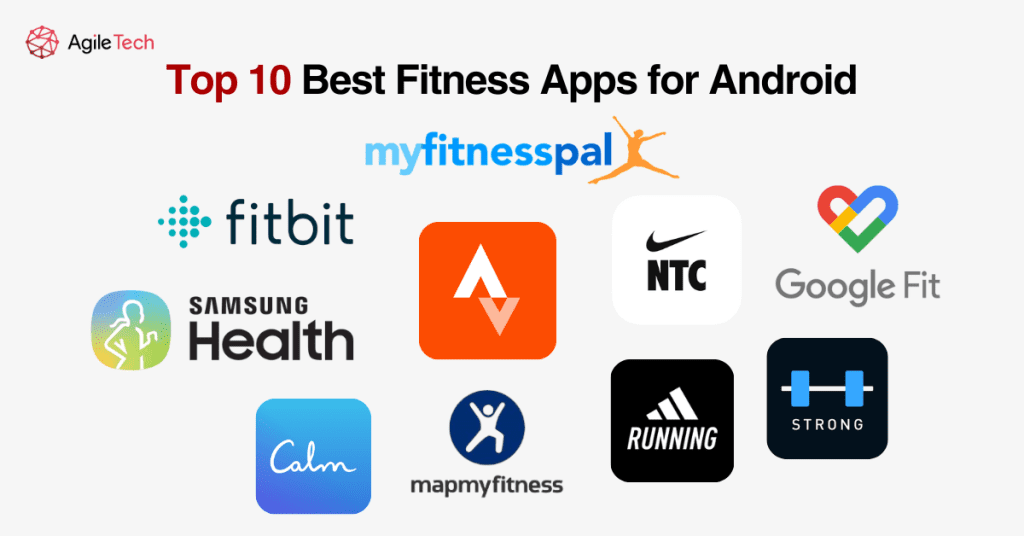
Snapshot of the Best Fitness Apps for Android
| Highlighted Features | Best For | Pricing | |
|---|---|---|---|
| Strava | GPS tracking, social features, and segment challenges | Runners and cyclists | Free; Premium $7.99/month |
| MyFitnessPal | Nutrition tracking, extensive food database, and workout logging | Weight management | Free; Premium $9.99/month |
| Nike Training Club | HD workout videos, personalized plans, integration with music apps | Home workouts | Completely free |
| Fitbit | Comprehensive health tracking, sleep analysis, and heart rate monitoring | All-around fitness tracking | Free; Premium $9.99/month |
| GoogleFit | Simple interface, activity points, integration with other health apps | Casual users | Completely free |
| SamSung Health | Comprehensive tracking, food database, and sleep monitoring | Samsung device users | Completely free |
| Adidas Running | Audio coaching, route planning, and community challenges | Runners | Free; Premium $9.99/month |
| Strong | Workout templates, exercise tracking, progress graphs | Strength training | Free; Premium $4.99/month |
| Calm | Meditation sessions, sleep stories, breathing exercises | Mental wellness | Free; Premium $14.99/month |
| MapMyFitness | Route discovery, workout variety, and training plans | Multi-sport athletes | Free; Premium $5.99/month |
1. Strava
Strava stands out as the premier fitness tracker app for Android users passionate about running and cycling. Its sophisticated GPS functionality maps routes with exceptional precision while providing detailed metrics, including pace, distance, elevation gain, and heart rate data when connected to compatible sensors. The app’s defining feature is its community aspect – users can follow friends, share activities, give kudos, and participate in challenges that foster healthy competition and accountability.
The segment feature divides popular routes into sections where users can compete for personal records or leaderboard positions, creating an engaging competitive element within the app. For premium subscribers, advanced training metrics like relative effort and fitness level tracking provide valuable insights into performance trends and recovery needs. Strava’s interface prioritizes activity feed and performance statistics in a clean, intuitive layout that appeals to data-focused athletes.
Pros:
- Advanced GPS tracking with impressive accuracy
- Robust community features create a motivating social experience
- Segment challenges allow friendly competition on specific routes
- Detailed performance analytics including pace, elevation, and heart rate zones
- Integrates seamlessly with most fitness watches and external sensors
- The training log provides a comprehensive activity history
Cons:
- Most advanced features require a premium subscription
- Battery drain can be significant during extended GPS tracking
- Privacy concerns with public activity sharing (though settings are adjustable)
- Limited strength training and cross-training options
- The interface can be overwhelming for beginners
2. MyFitnessPal
MyFitnessPal reigns supreme among fitness tracker apps, focusing on nutritional aspects of health. The application’s comprehensive food database includes millions of items, making meal tracking exceptionally convenient through manual entry or barcode scanning. Users receive detailed nutritional breakdowns including macronutrients (proteins, carbohydrates, fats) and micronutrients (vitamins, minerals), creating awareness about dietary habits beyond simple calorie counting.
The app excels in personalization by calculating recommended caloric intake based on individual parameters and goals, whether weight loss, maintenance, or muscle gain. Its workout logging capabilities complement nutritional tracking, providing a complete picture of caloric balance. Premium subscribers gain access to meal planning tools, advanced nutrient analysis, and an ad-free experience. MyFitnessPal connects seamlessly with numerous fitness devices and apps, centralizing health data effectively.
Pros:
- Extensive food database with over 11 million items
- Barcode scanner for easy food logging
- Detailed nutrition breakdown beyond just calories
- Connects with over 50 apps and devices
- Customizable macro and nutrient goals
- Active community forums for support and advice
Cons:
- Some premium features were formerly free
- Food database entries can have user-generated inaccuracies
- Exercise calorie calculations sometimes overestimate
- It can be time-consuming to log meals consistently
- Occasional syncing issues with connected devices
3. Nike Training Club
Nike Training Club delivers professional-quality workout content entirely free, distinguishing it in the marketplace of fitness tracker apps. The application features hundreds of workouts ranging from 5-60 minutes across various categories, including strength, cardio, yoga, and mobility. Each workout includes clear video demonstrations from expert trainers with audio guidance and visual timers.
The app creates personalized training plans based on fitness assessment results, available equipment, and specific goals. These structured programs adapt to progress and provide balance across workout types. The clean, motivational interface emphasizes workout selection and progress tracking with achievement badges for completed milestones. Nike Training Club excels in workout guidance but offers more basic tracking features compared to dedicated fitness trackers, making it ideal for users focused on guided exercise sessions rather than comprehensive health monitoring.
Pros:
- High-quality workout videos with professional instruction
- Personalized training plans based on goals and equipment
- Completely free with no premium tier necessary
- Regular content updates with new workouts
- Audio guidance option for screen-free workouts
- Integrates with music streaming services
Cons:
- Requires considerable device storage space for videos
- Limited tracking capabilities compared to dedicated trackers
- No direct nutrition tracking component
- Some workouts require equipment
- Cannot create custom workouts from the exercise library
4. Fitbit
Although optimized for Fitbit device owners, the Fitbit app provides substantial functionality as a standalone activity tracker app for Android. The application excels in comprehensive health tracking, including steps, distance, calories burned, and active minutes. Its sleep analysis feature provides detailed insights into sleep stages and quality, offering actionable recommendations for improvement.
The app’s automatic activity recognition detects common exercises without manual input, while the exercise modes allow detailed tracking of specific workouts. Fitbit’s guided breathing sessions and stress management score help users monitor and reduce stress levels. The food logging system includes a database, water intake tracking, and calorie balance calculations. Premium subscribers receive additional benefits, including advanced health insights, guided programs, and video workouts. The social features facilitate connections with friends for challenges and motivation, creating an all-encompassing health management system.
Pros:
- Comprehensive health metrics tracking
- Advanced sleep analysis with sleep stages
- Continuous heart rate monitoring
- Automatic workout detection
- Guided breathing sessions for stress management
- Female health tracking features
Cons:
- Full functionality requires a Fitbit device
- Premium subscription needed for advanced insights
- Mobile-only challenges (no web interface)
- Occasional syncing issues reported
- Limited customization for workout tracking
5. Google Fit
Google Fit provides a streamlined approach to fitness tracking through its Heart Points and Move Minutes metrics, simplifying activity monitoring for casual users. The app automatically tracks walking, running, and cycling through your Android device’s sensors, while manual logging accommodates other activities. Its clean interface prioritizes daily activity circles showing progress toward goals, with additional sections for weight tracking and heart rate monitoring.
The application’s integration capabilities allow it to serve as a central hub for health data from various sources, including third-party apps and compatible fitness devices. Google Fit emphasizes accessibility and simplicity rather than advanced features, making it ideal for users seeking basic fitness tracking without overwhelming complexity. Despite lacking some specialized features of dedicated fitness apps, it provides reliable core functionality completely free of charge.
Pros:
- Clean, intuitive interface
- Heart Points system based on WHO recommendations
- Integrates seamlessly with the Android ecosystem
- Automatic activity detection
- Compatible with numerous third-party apps
- Completely free with no premium tier
Cons:
- Fewer advanced features than specialized apps
- Limited social and motivational elements
- Basic nutrition tracking capabilities
- Occasional GPS tracking inconsistencies
- Minimal guided workout content
6. Samsung Health
Samsung Health delivers an impressively comprehensive suite of health tracking features without requiring additional hardware (though it integrates exceptionally well with Samsung wearables). The application’s home screen presents a complete dashboard of health metrics, including steps, heart rate, sleep, stress, and more. Its activity tracking capabilities cover numerous exercise types with GPS mapping for outdoor activities and detailed performance metrics.
The nutrition tracking component includes a substantial food database with barcode scanning functionality and water intake monitoring. Samsung Health’s sleep analysis provides insights into sleep patterns and quality based on device sensors or connected wearables. Additional features include weight management tools, stress tracking with guided breathing exercises, and women’s health tracking. The Together tab facilitates friendly competition through challenges and global rankings, adding social motivation to the experience.
Pros:
- Comprehensive health tracking dashboard
- Built-in step counter with no additional devices required
- Extensive food database for nutrition tracking
- Guided workout programs with video demonstrations
- Sleep tracking with detailed analysis
- Challenges and leaderboards for motivation
Cons:
- Some features work best with Samsung devices
- The interface can appear cluttered with many features
- Occasional syncing delays with third-party services
- Limited customization for workout tracking
- Some users report battery drain issues
7. Adidas Running (formerly Runtastic)
Adidas Running focuses on delivering an exceptional running tracking experience with features catering specifically to runners of all levels. The app tracks runs via GPS with metrics including distance, pace, elevation, and also works as a calories tracker app, while audio feedback provides real-time performance updates during activities. Post-run analysis presents comprehensive data visualization through maps, graphs, and progress statistics.
The application’s training plan feature develops personalized running programs based on goals such as distance improvement, weight loss, or race preparation. Community features allow users to participate in challenges, share achievements, and connect with fellow runners. Premium subscribers gain access to interval training, advanced statistics, training plans, and an ad-free experience. While primarily focused on running, the app also tracks other cardio activities, though with fewer specialized features than the running functionality.
Pros:
- Detailed running analytics and performance metrics
- Audio coaching during workouts
- Customizable training plans for various goals
- Route discovery and planning features
- Live tracking for safety and sharing
- Comprehensive post-run analysis
Cons:
- Most advanced features require a subscription
- Primarily focuses on running, limits other activity tracking
- Some users report occasional GPS accuracy issues
- Battery-intensive during tracking sessions
- Limited nutrition tracking capabilities
8. Strong
Strong establishes itself as the premier fitness tracker app for weightlifting and strength training enthusiasts. Unlike general fitness apps, Strong focuses exclusively on resistance training with specialized features for gym-goers. The app’s workout tracker provides intuitive logging of sets, reps, and weights with one-tap functionality to record working sets based on previous performance.
The extensive exercise library includes proper form descriptions and muscle targeting information, while the routine builder allows creation of customized workout templates. Strong’s rest timer helps maintain optimal recovery periods between sets, and the plate calculator quickly determines barbell plate configurations. The progress section displays performance graphs for individual exercises, body measurements, and personal records. While lacking the breadth of all-purpose fitness apps, Strong excels in its specialized niche with depth and functionality specifically tailored to strength training.
Pros:
- Focused specifically on strength training needs
- Clean, intuitive workout logging interface
- An extensive exercise library with proper form guidance
- Plate calculator for barbell exercises
- Rest timer functionality between sets
- Detailed progress tracking with performance graphs
Cons:
- Limited cardiovascular exercise tracking
- Basic free version with a workout routine limit
- No nutrition tracking component
- Minimal social or community features
- No guided workouts or training plans
9. Calm
While not a traditional fitness tracker app, Calm addresses the crucial mental wellness component of overall health. The application provides guided meditations ranging from beginner sessions to advanced practices across categories, including anxiety, stress, focus, and gratitude. Its signature Sleep Stories feature offers narrated bedtime tales designed to facilitate relaxation and improve sleep quality.
Calm’s breathing exercises deliver structured breathing techniques proven to reduce stress and anxiety. The Daily Calm provides a new 10-minute meditation each day to build a consistent mindfulness practice. Calm masterclasses offer audio courses on various wellness topics from experts. The app tracks meditation minutes, sessions completed, and longest streak to quantify mental fitness progress. For users recognizing that complete fitness encompasses both physical and mental wellness, Calm provides essential tools for psychological well-being.
Pros:
- Extensive library of guided meditations
- Sleep Stories narrated by celebrities
- Breathing exercises for stress reduction
- Daily Calm sessions for consistent practice
- Beautiful interface with nature sounds and scenes
- Tracks meditation streaks and minutes
Cons:
- Limited free content
- Relatively expensive premium subscription
- No physical activity tracking features
- Requires a consistent internet connection for most features
- Large app size due to audio content
10. MapMyFitness
MapMyFitness provides versatile tracking capabilities for numerous activity types, making it ideal for multi-sport athletes and fitness enthusiasts. The app excels in route mapping with features to discover popular routes in new areas or create custom paths with elevation information. GPS tracking monitors performance metrics including distance, duration, pace, and calories burned across hundreds of activity types from traditional exercises to outdoor adventures.
The application’s training plan feature provides structured programs for various goals, while the workout library offers pre-designed exercise routines. The gear tracker functionality monitors equipment usage to indicate when replacements might be needed based on mileage or activity hours. Community features include challenges sponsored by fitness brands with potential prizes, adding extra motivation. While maintained by Under Armour, MapMyFitness maintains compatibility with numerous third-party devices and services for comprehensive health data integration.
Pros:
- Tracks over 600 activities beyond just running
- Route discovery for finding popular paths
- Gear tracker monitors equipment usage and replacement needs
- Comprehensive training plans for various goals
- Community challenges with rewards
- Friends leaderboard for motivation
Cons:
- Mobile app can be resource-intensive
- The interface can feel dated compared to newer apps
- Ad presence in the free version can be distracting
- Some users report occasional GPS accuracy issues
- Premium required for advanced training plans
4. How to Build a Custom Fitness App
Creating a custom fitness app requires a structured approach across several key development phases:
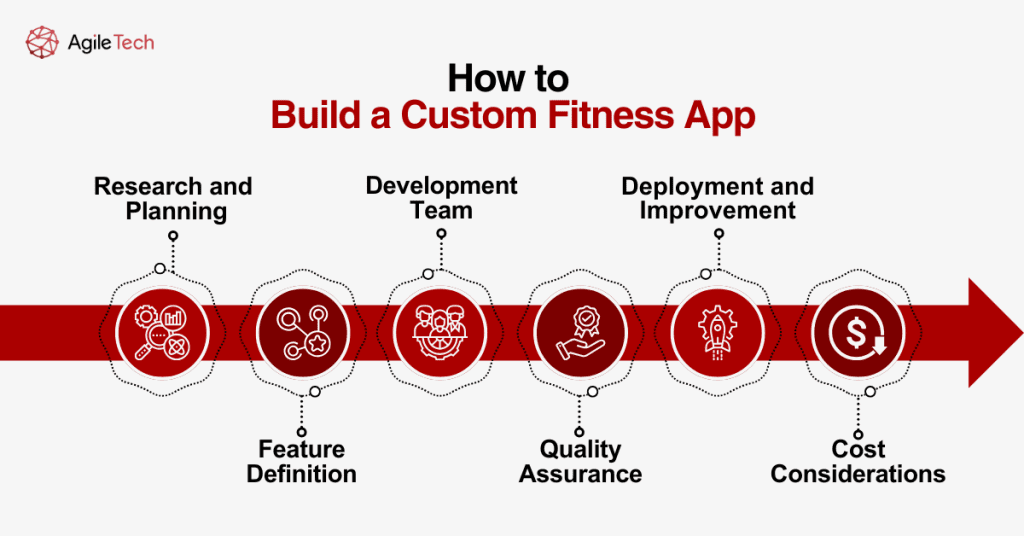
Research and Planning
Conduct market analysis to identify user needs and competitor offerings. Research the technical capabilities of Android devices and the regulatory requirements for health data. Define clear objectives and target audience specifications.
Feature Definition
Determine core tracking metrics, required sensors, and integration requirements with existing health platforms. Design user experience flow through wireframing and establish database architecture for secure health data management.
Development Team
Assemble specialists, including Android developers, UI/UX designers, backend developers, QA specialists, and health domain experts. Choose between in-house development or partnership with specialized development companies based on expertise and budget constraints.
Quality Assurance
Implement rigorous testing protocols, including tracking accuracy verification, performance testing under various conditions, security validation for health data protection, and usability testing with target users.
Deployment and Improvement
Adhere to Google Play Store guidelines for health applications, implement analytics frameworks for monitoring user behavior, and establish channels for user feedback. Create a schedule for regular updates based on performance data and emerging technologies.
Cost Considerations
Budget for development costs ($30,000-$150,000 depending on complexity), ongoing maintenance (15-20% of development cost annually), server expenses, and marketing. Consider phased development to validate market fit before significant investment.
Development timelines typically range from 4-9 months, depending on feature complexity, with proper planning and experienced development teams essential for successful implementation.
5. Conclusion
The Android fitness app marketplace offers powerful tools to transform your health journey through comprehensive tracking, personalized guidance, and motivational features. Each app reviewed provides unique strengths aligned with specific fitness goals, from running and strength training to nutrition management and mental wellness.
For organizations considering custom app development, the market demonstrates clear demand for specialized health solutions that address specific user needs. Whether selecting an existing application or developing custom software, these digital health companions represent valuable assets in achieving and maintaining optimal wellness.