 Nguyen Manh Thang
Chief Executive Officer, AgileTech Vietnam
Nguyen Manh Thang
Chief Executive Officer, AgileTech Vietnam
- Published
- Read time
- 13 min
- Views
- 150

Read the AI overview
An API is a contract: the set of requests a service accepts and the responses it returns, callable from any language with an HTTP client. An SDK is a kit built on top of that contract: a library in your language plus tooling, documentation, and samples that handle authentication, retries, serialization, and platform quirks so you do not have to. They are not alternatives; every SDK wraps an API, and the real question is which layer you should integrate at. Consume the SDK when you want speed, when the vendor's SDK is mature in your language, and when you are happy to inherit its dependencies and release cadence. Call the API directly when you need control over the HTTP layer, when the SDK is thin or lagging, when your language is unsupported, or when you are wrapping the vendor behind your own adapter anyway. If you are the vendor, ship the API first and treat it as the product, then add SDKs for the languages your customers actually use, generated from the API specification so they cannot drift.
Almost every integration decision starts with a vendor page offering two doors: the REST API reference and a set of SDKs for a dozen languages. Teams walk through one or the other without much thought, and the choice quietly shapes the next three years of that integration: how fast it ships, how it breaks, how hard it is to replace, and how much of the vendor's code ends up in your build.
This article is the comparison. It defines SDK and API precisely, shows how they relate with real examples from payments, maps, and mobile platforms, works through when to consume each, prices the coupling an SDK brings, and then flips the question for teams building their own platform: should you ship an SDK, an API, or both. For the deeper anatomy of what a good SDK contains and how to evaluate one, the companion piece on what an SDK is covers that ground; here the subject is the choice.
The framing throughout is practical. These are the decisions API and integration teams make on every project, and the wrong default in either direction has a recognizable cost: the SDK-always team that cannot ship because a vendor library conflicts with another, and the API-always team that rewrote authentication and retry logic the vendor had already solved.
Key takeaways
- An API is the contract, an SDK is the convenience layer that implements the contract in your language. Every SDK wraps an API; the choice is which layer to integrate at, not which one exists.
- Consume the SDK for speed and correctness when it is mature in your language. Call the API directly when you need HTTP-level control, when the SDK lags the API, or when your language is unsupported.
- SDKs cost you coupling: their dependencies, their bundle size, their release cadence, and their bugs become yours. An adapter layer of your own limits the damage either way.
- Mobile is where SDKs earn their keep, because platform integration (push, payments, sign-in, analytics) involves OS-level work that an HTTP API cannot express.
- If you are the vendor, the API is the product and the SDKs are distribution. Design the API specification first, generate SDKs from it, and version both together.
- The three questions that settle the choice: how mature is the SDK in my language, how much control do I need over the transport, and am I wrapping this vendor behind my own interface regardless.
SDK vs API: the definitions that make the comparison possible

An API, an application programming interface, is a contract between two pieces of software. For a web service it is the set of endpoints, the request formats they accept, the responses they return, the authentication they require, and the error semantics they follow. The contract is language-neutral: anything that can make an HTTP request can use a REST API, and anything that can open a socket can use a lower-level one. The API is the thing that actually does the work, or rather, the thing that lets you ask the vendor's servers to do the work.
An SDK, a software development kit, is a package of tools for building against a platform or service, and for a web service it centers on a client library in a specific language that calls the API for you. A good SDK also handles authentication, retries with backoff, request signing, pagination, serialization to and from typed objects, and platform specifics, and it ships with documentation, examples, and often a command-line tool or test harness. The SDK does not do the work; it makes asking for the work easier and safer in one language.
The relationship is nesting. Every SDK contains code that calls an API, so the SDK cannot do anything the API cannot. The API can always be called without the SDK. This is why the comparison is really about integration depth: whether you write to the vendor's contract yourself or accept the vendor's implementation of that contract in your language. Neither is universally right, and the rest of this article is about which is right when.
SDK and API, side by side
| Dimension | API | SDK |
|---|---|---|
| What it is | A contract: endpoints, formats, auth, errors | A kit: client library, tooling, docs, samples |
| Language | Neutral; anything that speaks HTTP | Specific; one package per language or platform |
| Who writes the calling code | You | The vendor, you call their functions |
| Auth, retries, pagination | Your responsibility | Usually handled |
| Dependencies added to your build | An HTTP client you already have | The SDK and everything it depends on |
| Lags behind new features | Never; the API is the source | Often, by weeks to months per language |
| Platform integration (push, payments UI) | Cannot express OS-level work | The main reason mobile SDKs exist |
The API is the contract and does the work; the SDK is one vendor's implementation of calling that contract in one language.
How the two layers look in practice: payments, maps, and mobile platforms
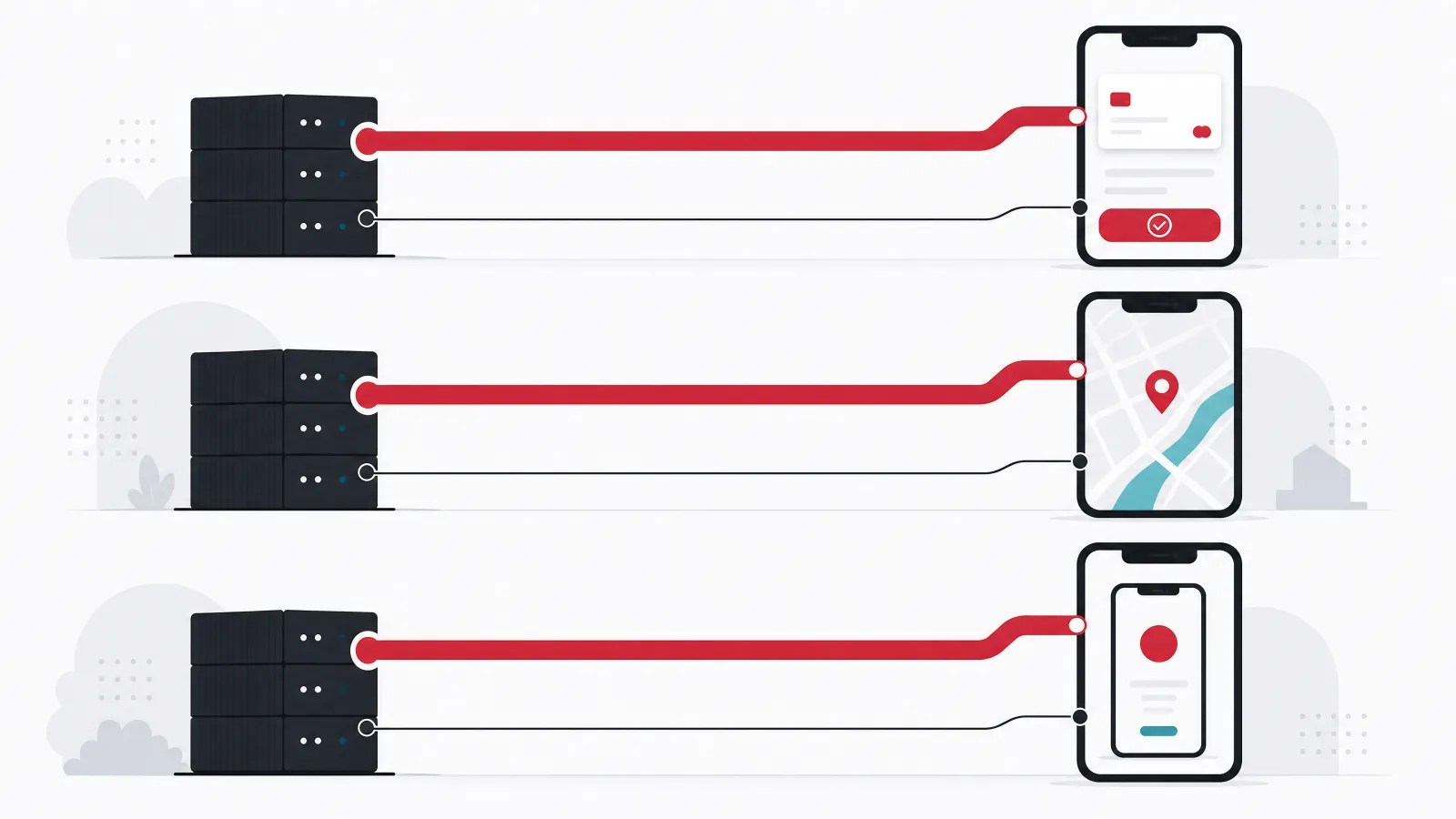
Payments make the cleanest example. A payment processor exposes a REST API: create a customer, create a payment intent, confirm it, handle the webhook that says it succeeded. You can call every one of those endpoints with curl. The same processor ships server SDKs in eight or more languages that wrap those endpoints in typed methods with idempotency keys and retries built in, plus mobile SDKs that do something the API cannot: render a PCI-compliant card entry form on the device so card numbers never touch your servers. The server SDK is a convenience; the mobile SDK is a capability.
Maps show the same split from a different angle. A maps vendor's HTTP APIs return geocoding results, routes, and static map images as JSON or PNG, callable from any backend. Its JavaScript and mobile SDKs render interactive maps, handle gestures and tiles, cache aggressively, and integrate with the device's location services. Nobody builds an interactive map by calling the tile API themselves; everybody geocodes addresses from a backend job by calling the API directly, because pulling a rendering SDK into a batch process would be absurd. The same vendor, both layers, and the right choice depends entirely on what you are doing.
Mobile platforms are where the SDK is not optional. Push notifications, in-app purchases, sign-in with the platform account, analytics, crash reporting, and advertising all require code running inside the app process with access to OS facilities, and the platform vendors ship that code as SDKs because there is no other way to deliver it. This is also where the costs of SDKs bite hardest: binary size, startup time, permission prompts, and the dependency conflicts that arise when six vendors' SDKs each bundle their own networking library. The shipping API guide on this site is a worked example of the backend side, integrating carrier APIs directly because control over rates and retries mattered more than convenience.
One payment vendor, three integration surfaces
REST API
- What it does
- Create customers, payment intents, refunds; receive webhooks
- Call from
- Any language, any runtime, curl
- You handle
- Auth headers, idempotency, retries, pagination, error mapping
Server SDK
- What it adds
- Typed methods, idempotency keys, retries, response objects
- Call from
- The eight or so languages the vendor supports
- You inherit
- Its dependencies, its release cadence, its occasional bugs
Mobile SDK
- What it adds
- PCI-scoped card entry UI, wallet buttons, 3D Secure flows on device
- Call from
- iOS, Android, and cross-platform wrappers
- Why it is not optional
- Card data must never reach your servers; only on-device code can do that
When to consume the SDK

Use the SDK when it is mature in your language and you want to ship quickly and correctly. A well-maintained SDK encodes hundreds of small decisions you would otherwise make yourself: how to sign requests, how to back off when rate-limited, how to page through large result sets, how to parse the fourteen error shapes the API can return. Teams that skip a mature SDK to call the API directly usually end up rewriting a worse version of it over the following months, one production incident at a time.
Use the SDK when the integration requires platform work an API cannot express. On mobile this covers payments UI, push, sign-in, biometrics, and anything else that lives in the OS. On the web it covers embedded widgets, real-time connections with reconnection logic, and browser-side encryption. In these cases the SDK is not wrapping an API for convenience; it is delivering a capability, and there is no direct-API alternative to weigh it against.
Use the SDK when the vendor generates it from the API specification and versions the two together. Generated SDKs lag less, drift less, and break less than hand-written ones, and a vendor that publishes an OpenAPI or similar specification and derives the SDKs from it is signaling that the API is the source of truth. You can check this in minutes: look at the SDK repository, see whether the code is generated, and compare the SDK changelog against the API changelog for lag.
- Mature in your language: recent releases, an active issue tracker, and coverage of the endpoints you need. Check before committing.
- Platform capability required: payments UI, push, sign-in, real-time connections. No direct-API alternative exists.
- Generated from the spec: derived SDKs lag and drift less. The repository shows you whether it is generated.
- Speed matters more than control: an MVP integrating a vendor for the first time should take the fast path and wrap it later if needed.
When to call the API directly

Call the API directly when you need control over the transport. Custom timeouts, connection pooling tuned for your traffic, request tracing that fits your observability stack, a specific HTTP client your platform mandates, or a proxy in the path: SDKs expose some of these knobs and hide others, and fighting an SDK to get at the HTTP layer beneath it is worse than writing the calls yourself. High-volume backend integrations frequently land here, because the SDK's defaults were tuned for the median customer and you are not the median.
Call the API directly when the SDK is thin, lagging, or absent for your language. A community-maintained SDK three versions behind the API is a liability, not a convenience. A vendor whose SDK for your language was last updated eighteen months ago is telling you something about their investment in it. And for languages outside the vendor's list, the API is the only option, which is one reason polyglot organizations often standardize on direct API integration behind an internal client of their own.
Call the API directly when you are going to wrap the vendor behind your own adapter regardless. Many teams, sensibly, do not let vendor types leak into their domain: they define an interface for what the business needs, payments, geocoding, messaging, and implement it against the vendor. Once that adapter exists, the SDK's typed objects and convenience methods are used in exactly one place, and the SDK's dependencies and release cadence are being paid for across the whole build to save a few dozen lines in one file. The adapter is also what makes switching vendors a bounded task rather than a rewrite.
What an SDK actually costs you: dependencies, size, cadence, and bugs

The convenience of an SDK is paid for in coupling, and the coupling has four components worth naming. Dependencies: the SDK brings its own, and those can conflict with yours, pin versions you wanted to upgrade, or add supply-chain exposure you now have to monitor. Size: on mobile and in the browser, every SDK is bytes the user downloads and code that runs at startup, and a dozen vendor SDKs can account for a large fraction of an app's binary. Cadence: the SDK releases when the vendor decides, deprecates when the vendor decides, and occasionally drops support for a platform version you still ship to. Bugs: the SDK has them, and when it does, you are debugging someone else's code with a fix schedule you do not control.
These costs are real but they are not arguments against SDKs in general; they are arguments for choosing them deliberately. A backend service with one payment SDK and one cloud SDK is paying a small, predictable coupling tax for a large convenience benefit. A mobile app with fourteen SDKs from analytics, attribution, advertising, crash reporting, and feature flag vendors has a startup time problem, a binary size problem, and a privacy disclosure problem, and the fix is fewer SDKs, not zero.
The mitigation is the same in every case. Wrap the vendor behind an adapter you own. Pin SDK versions and upgrade on your schedule, with tests. Audit the dependency tree the SDK brings, especially on mobile where the quality and testing effort to catch a startup regression is much higher than on a server. And keep a short list of the SDKs you carry, with a reason next to each one, because SDKs accumulate and nobody removes them.
The coupling tax, in four lines
If you are the vendor: ship an API, an SDK, or both?

For a team building a platform others will integrate with, the question inverts, and the answer has a clear order. The API comes first and it is the product: a well-designed, well-documented, consistently versioned API with a published specification is the thing every customer will ultimately depend on, whether they call it directly or through an SDK. Invest in its design, its error semantics, its authentication model, its rate limiting, its webhooks, and its documentation before writing a single SDK, because SDK quality is bounded by API quality and no client library rescues an inconsistent contract.
SDKs come second and they are distribution. They lower the barrier for the languages your customers actually use, and the emphasis is on actually: an SDK for a language none of your customers write is maintenance cost with no return. Start with the two or three languages your customer analytics show, generate them from the API specification so they cannot drift, version them together with the API, and publish them through the package managers developers already use. A generated SDK with thin hand-written ergonomics on top is the pattern that scales; a hand-written SDK per language is the pattern that rots.
Mobile SDKs are a third category with their own rules. If your platform needs code on the device, for a UI component, a secure capture flow, or a background capability, you are shipping a mobile SDK whether you want to or not, and it has to meet the bar mobile developers hold vendors to: small, fast to initialize, no unnecessary permissions, no conflicting dependencies, and a clear privacy manifest. Teams that have shipped platform products with public APIs consistently report that the mobile SDK is the most expensive integration surface to maintain and the one that generates the most support tickets, which is a reason to ship it only when the capability genuinely requires it.
Shipping a platform: the order that holds up
-
Design the API as the productFirst
Consistent resources, explicit versioning, documented errors, idempotency, webhooks, rate limits. Publish an OpenAPI or equivalent specification.
-
Reference docs and a sandboxWith the API
Every endpoint documented from the spec, with a sandbox environment and test credentials. Direct API integrators need nothing else.
-
Generate SDKs for the languages customers useSecond
Two or three at first, derived from the spec, versioned with the API, published to package managers. Thin hand-written ergonomics on top.
-
Mobile SDK only if the capability demands itOnly when required
On-device UI, secure capture, background work. Hold it to the mobile bar: small, fast, minimal permissions, clean dependencies.
The decision in three questions
The first question is about the SDK's maturity in your language. Look at release frequency, endpoint coverage for what you need, the issue tracker, and whether it is generated from the specification. A mature SDK is a strong default; an immature one is a reason to go direct. The second question is about transport control. If you need custom timeouts, pooling, tracing, a mandated HTTP client, or a proxy, and the SDK does not expose the knobs cleanly, go direct. If the defaults are fine, the SDK is fine. The third question is whether you are wrapping the vendor behind your own adapter anyway. If yes, the SDK's convenience is confined to one file and its coupling is spread across the build, which tilts toward direct unless the SDK delivers a platform capability.
Two situations short-circuit the questions. Platform capabilities on mobile and in the browser, payments UI, push, sign-in, real-time, require the SDK and there is no decision to make. Batch and high-volume backend integrations where every millisecond and every retry policy is tuned usually go direct, because the SDK's median-customer defaults are the wrong defaults for you.
Whatever the answer, write it down next to the integration with the reasoning. The decision will be revisited when the SDK breaks, when the vendor changes pricing, or when a new engineer asks why the codebase calls this API directly while using the SDK for that one. A one-paragraph note answering that question saves an afternoon of archaeology and prevents the well-meaning refactor that makes it worse.
SDK or direct API: the three questions as branches
For this vendor, in this codebase, which layer do we integrate at?
-
The integration needs on-device or in-browser capability (payments UI, push, sign-in, real-time)
SDK. There is no direct-API path to the capability.
OS and browser facilities are only reachable from code running in the process.
-
The SDK is mature in our language and default transport behavior is acceptable
SDK, behind our own adapter.
Speed and correctness for the cost of a bounded coupling tax.
-
We need transport control, the SDK lags or is thin, or our language is unsupported
Direct API, behind our own adapter.
Control and currency outweigh convenience; the adapter keeps vendor types out of the domain.
-
This is a high-volume backend integration with tuned retry and pooling policies
Direct API, with our own client.
SDK defaults were tuned for the median customer. You are not the median.
Frequently asked questions
What is the difference between an SDK and an API?
An API is a contract: the endpoints a service exposes, the requests it accepts, the responses and errors it returns, and the authentication it requires, callable from any language. An SDK is a kit built on top of that contract: a client library in one language plus tooling, documentation, and samples that handle authentication, retries, serialization, and platform specifics. Every SDK wraps an API; the API can always be used without the SDK.
Is an SDK better than an API?
Neither is better; they are different layers of the same integration. The SDK is faster to adopt and encodes correct handling of auth, retries, and pagination, at the cost of adding the vendor's dependencies, size, and release cadence to your build. The direct API gives full control over the transport and never lags new features, at the cost of writing that handling yourself. Mature SDK in your language: use it. Need transport control or the SDK lags: go direct.
Can you use an API without an SDK?
Yes, always. A REST API is callable from any HTTP client, including curl, and many production integrations call vendor APIs directly with an in-house client. The SDK is a convenience layer, never a requirement, except where it delivers a platform capability such as on-device payment UI or push notifications that an HTTP API cannot express. In those cases the SDK is the only route to the capability.
Why do mobile apps need SDKs instead of just calling APIs?
Because much of what mobile integrations do happens inside the app process with access to operating system facilities: rendering a PCI-scoped card form, receiving push notifications, presenting the platform sign-in sheet, reading biometric results, reporting crashes. None of that can be done by an HTTP request to a server. Mobile SDKs deliver that code; the cost is binary size, startup time, permissions, and dependency conflicts, which is why apps should carry as few as they genuinely need.
Should my platform offer an SDK or an API?
Both, in that order. The API is the product: design it carefully, publish a specification, document every endpoint, and version it explicitly, because every customer depends on it whether or not they use an SDK. Then generate SDKs from the specification for the two or three languages your customers actually use, versioned with the API and published to their package managers. Ship a mobile SDK only if your platform needs code on the device.
What is an adapter layer and why does it matter for SDK vs API?
An adapter is an interface you own that expresses what your business needs from a vendor, payments, geocoding, messaging, implemented once against the vendor's SDK or API. The rest of your code depends on the adapter, not the vendor. It confines the SDK-or-API decision to one file, keeps vendor types out of your domain model, bounds the damage when the vendor breaks something, and turns switching vendors from a rewrite into a contained task.
When the integration layer needs to be built to last, AgileTech is an AI native software development company in Vietnam that designs adapters, APIs, and SDKs for platforms and the products that consume them.
Source: https://agiletech.vn/blog/sdk-vs-api/ · (c) AgileTech Vietnam. Printed from agiletech.vn.
